

Give each Microsoft Word document its own values from a Microsoft Excel spreadsheet
BatchDocProcessor gives every Microsoft Word document in a folder its own values, such as a document number, a revision or a title, from one Microsoft Excel workbook or CSV file, on your Windows PC. Click Create spreadsheet from folder to get a sheet with a row for each document. Change what you need in Microsoft Excel, save, and run. With Update property fields in the same job, the values show in headers and footers without starting Microsoft Word.
Updated
In Microsoft Word, with a macro, or in one run.
A new header template is the same for every file. The document number, title and revision in it are not: each document needs its own.
In Microsoft Word
- Open a document, type its values under File › Info › Properties › Advanced Properties, and check that the header shows them. Then the next one.
- Across 200 files, one wrong revision or one skipped document is easy to miss.
- Nothing checks that every document got the values from its own row.
A macro
- Someone has to write it, test it and keep it working.
- It has to match each row to its file, subfolders included, and tell standard properties from custom ones.
- A first sheet with the current values, and a check of every row before a file changes, are extra work.
BatchDocProcessor
- Create spreadsheet from folder writes the first sheet with each document's current values. You change only what differs.
- Check values lists every document with the values it will get, before any file is touched.
- A blank cell changes nothing, and a property without a column stays as it is. Copies are edited by default.
How do I give every document in a folder its own values from Microsoft Excel?
- 1
Put fields in your template
In the header template, place a field where each value belongs: Insert › Quick Parts › Field › DocProperty, with a name such as DocNo, Revision or Title. Add a custom property to the template first. The field dialog in Microsoft Word only lists the properties a document already has.
- 2
Create the spreadsheet
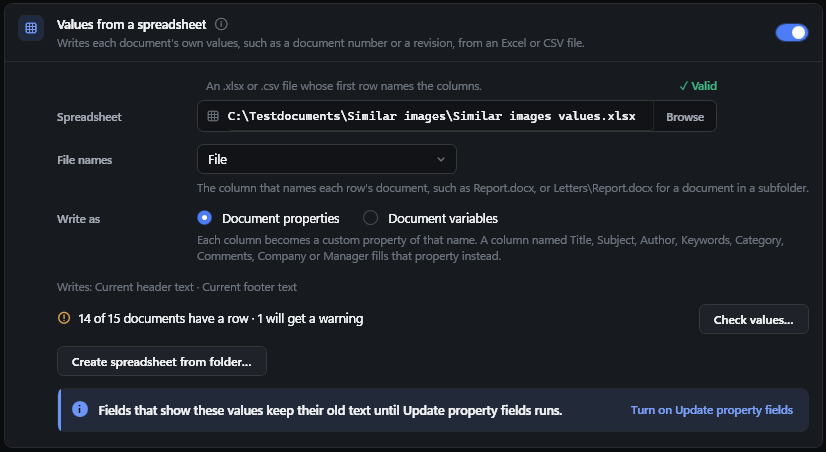
Click Create spreadsheet from folder on the card. You get a Microsoft Excel workbook (.xlsx) with a row for each document and its current values. Two last columns show the old header and footer text. They are never written into a document.
- 3
Fill it in with Microsoft Excel
Change the revisions, document numbers or titles, and save. A new column becomes a new custom property. When you save in Microsoft Excel and switch back to the app, it reads the sheet again.
- 4
Look before you run
Click Check values to see what each document will get. Filters show documents without a row, rows that match no document, and rows with a problem. Problems are errors in cells, duplicate rows and names that match more than one document.
- 5
Turn on the three steps
Turn on Headers and footers, Values from a spreadsheet and Update property fields. In the recommended run order they run in that order, so the new headers show each document's values.
- 6
Read the report
Each document has its own line. One without a row still gets the other steps, and the report gives it a warning. It counts towards the trial like the rest.
How the spreadsheet matches documents and properties
A Microsoft Excel workbook (.xlsx or .xlsm) or a CSV file, with one row per document. The first row names the columns. A file-name column (named File by default; you choose which) identifies the document. Every other column is a value.
- File-name column
- Report.docx for a document at the top of the folder, or Letters\Report.docx for one in a subfolder.
- Standard properties
- A column named Title, Subject, Author, Keywords, Category, Comments, Company or Manager fills that property. Last modified by can't be set.
- Custom properties
- Any other column name becomes a custom property. A DocProperty field in a header, a footer or the text can then show it.
- Document variables
- If your fields are DocVariable fields, choose Document variables on the card. The choice applies to every column.
- Values as shown
- Each value is written as text, the way Microsoft Excel shows the cell. Dates and numbers keep their look.
- Changes in Microsoft Excel
- The card reads the sheet again each time you come back to the app, and the run reads it once more when you click Start.
What it leaves alone
- Blank cells
- An empty cell leaves that document's value as it is. It neither deletes a value nor creates one.
- Properties without a column
- Anything a document has that the sheet doesn't name stays as it is.
- A sheet with a problem
- The run doesn't start until the problem is fixed in the spreadsheet. No document is touched before that.
- From the command line
- Run a saved preset with
--values <file>to use a new spreadsheet, for example in a scheduled task. Values from a spreadsheet must be on in that preset.
Good to know
- A cell that changes a date, number or yes/no property turns it into a text property. Check values marks this as a note, and the run still starts.
- Save the workbook before you click Start. While it is open in Microsoft Excel, the run uses what was last saved.
- When Set document properties writes the same property as the sheet, the step later in the run order wins. That is a warning, not an error.
- Fields keep their old text unless Update property fields or Update fields runs after this step. The card tells you, and offers to turn on Update property fields.
- By default, each document is copied to an output folder and only the copy changes.
Questions about spreadsheet values
Can each document get different values?
Yes, with Values from a spreadsheet. You provide an Excel workbook (.xlsx or .xlsm) or CSV file with one row per document. A file-name column matches each row to its file, and every other column writes a standard property (such as Title, Subject, Author or Company) or a custom property or variable.
Combined with Update property fields, those values show up in headers, footers and text without starting Microsoft Word. For values that stay identical across all documents, use Set document properties instead.
How does Check values preview spreadsheet changes?
Before anything is written, Check values previews every document alongside the values it will receive from the spreadsheet. Filters let you inspect documents without a matching row, rows that match no document, and data type problems.
Anything that would cause an error stops the run before any file is touched, while warnings are flagged for your review. Documents without a row still get every other step in the run and are noted in the report.
Are my documents uploaded anywhere?
No. BatchDocProcessor processes documents locally. The app contacts our servers only to activate, renew or release a license, to count the free trial, and, if enabled, to check for updates. Run reports store no document content.
Privacy noticeWhat happens when a document fails?
It is restored to its original state and left where it is, and the run continues. The report gives the reason and a hint. Files open elsewhere, read-only or protected by a password are reported as failed.
Which spreadsheet formats can I use?
Microsoft Excel workbooks (.xlsx and .xlsm) and CSV files (.csv). Create spreadsheet from folder on the card writes a pre-filled .xlsx file from your documents.
Can I use Values from a spreadsheet without replacing headers?
Yes. It works on its own or with any other step. If your documents already have the fields, turn on Values from a spreadsheet and Update property fields.
The values are stored in each document either way. Update property fields only changes the text the fields show.
Can it create new documents from a spreadsheet, like mail merge?
No. It changes documents that already exist in your folder. With 200 procedures or contracts, each one gets its own numbers and properties. It doesn't make a new document for each row.
Other jobs for a whole folder
- Rebrand every document in one run
- Change the headers and footers in every document
- Find and replace text in every document
- Convert old .doc files to .docx
- Update property fields without Microsoft Word
- Replace a logo in every document
- Remove metadata, comments and tracked changes
- Update links and paths after a server move
- All use cases
Try it on ten documents with your own spreadsheet.
Your originals stay unchanged by default, and the report shows what happened to each file.
- Every feature, for 7 days or 50 documents, whichever comes first.
- No license key, account or card needed. Needs an internet connection.
- When it ends, the editing steps lock. Nothing is charged or renewed.
- Processed on your PC. Your documents aren’t uploaded.