

How to edit many Microsoft Word documents at once
BatchDocProcessor makes the same change in every Microsoft Word document in a folder, in one run, on your Windows PC. It edits copies by default, restores any document it can't change safely, and writes a report line for every file. Microsoft Word itself, a macro, File Explorer or a script can do parts of the job; this page says where each one stops.
Updated .
One job for the whole folder
BatchDocProcessor is a Windows desktop application for batch editing Microsoft Word documents.
- 1
Choose the folder and an output folder
Your originals stay as they are. Each document is copied, and only the copy is edited.
- 2
Turn on the changes you need
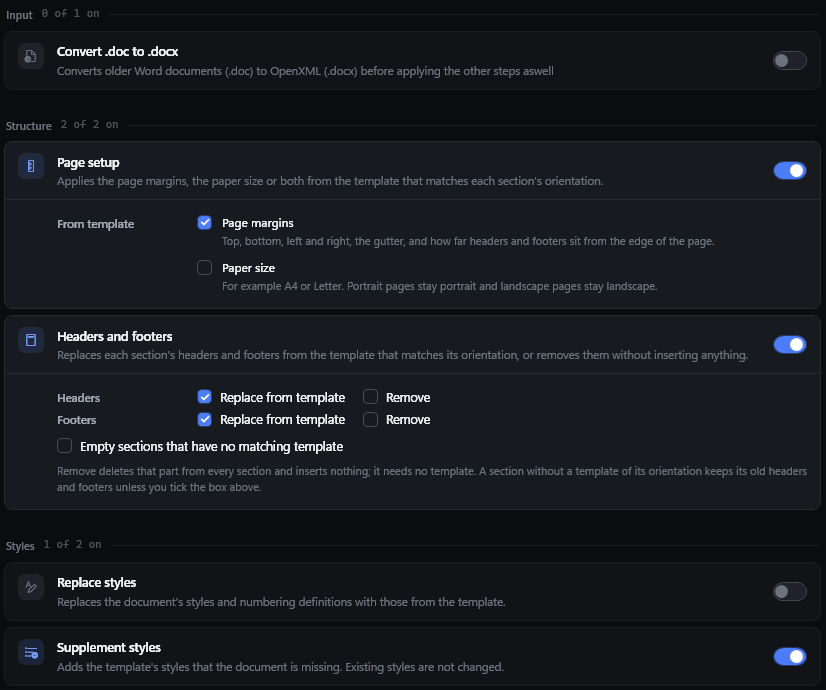
20 steps, from headers and footers to metadata, links, styles and PDF. One job can combine several.
- 3
Run it, and read the report
Anything that would stop the run is listed before it starts. Afterwards, every document has a line: Succeeded, Warnings, Failed or Skipped, with the reason.
- 4
Save it for next time
A saved job runs again on the next folder, or unattended from the command line.
What it does for each job
- A new letterhead
- Copies the headers and footers of your template into every document, section by section, with a landscape template for landscape pages. In Microsoft Word, each section has its own headers, and first and even pages can have their own too.Headers and footers
- The same text everywhere
- Runs an ordered list of rules in the body and, if you choose, headers, footers, notes, comments, charts and SmartArt, and finds text even where formatting splits it. Replace All works on one open document, and a short macro often reaches only the main text.Find and replace
- A new logo
- Recognizes the old picture by its content and replaces it in headers, footers, charts, SmartArt and cover pages. Microsoft Word has no built-in way to replace one particular picture everywhere at once.Replace a logo
- Metadata before a delivery
- Resolves tracked changes, removes comments and clears the items you tick, from 25, with a report line for every file. File Explorer clears eleven properties; Document Inspector cleans one open document at a time.Remove metadata
- Links after a server move
- Changes where links point across ten kinds of link target, including the attached template and the mail-merge data source. Microsoft Word changes linked objects one document at a time, and hyperlinks and templates are elsewhere.Links after a server move
- Old .doc files
- Converts each one to .docx, skips files already converted, and reports the macros a .docx can’t keep. Saving each file as .docx by hand is one file at a time.Convert .doc to .docx
- A different value in each document
- Writes each document’s own values from an Excel workbook or CSV file, one row per document, and previews them first. Mail merge creates new documents; it doesn’t edit existing ones.Values from a spreadsheet
Where the free ways stop
Each of them works for some jobs. None of them works on a whole folder with a record of what happened to each file.
- Microsoft Word
- Edits one open document at a time. Each section of a document has its own headers and footers. Nothing records which documents were changed.
- A macro
- Someone has to write it, test it on your documents and keep it working, even when an AI assistant writes the first version. It has to visit every part of a document: the headers of each section, footnotes, text boxes. It stops at a file that asks for a password, shows a dialog or is open elsewhere, unless it is written not to. It saves over the files it opens unless it makes copies, and it keeps no record. Every new kind of change, such as pictures or properties, is more code.
- File Explorer
- Clears eleven common properties of the selected files, such as Authors, Company and Manager. It keeps custom properties, the template path, comments, tracked changes and the names on them.
- A script
- For developers. Inside a .docx file, a sentence is stored in pieces wherever its formatting changes, and headers and footers are separate parts, so a plain search for a name misses the copies where one letter is bold.
Whatever you use, work on copies
A change made to hundreds of files is hard to undo. Run it on three or four typical documents first and open the results. Keep a list of the files that changed and the files that failed: that is the question someone asks a week later. BatchDocProcessor does both by default: it edits copies, and the report is the list.
The free trial
- Every feature, for 7 days or 50 documents, whichever comes first.
- No license key, account or card needed. Needs an internet connection.
- When it ends, the editing steps lock. Nothing is charged or renewed.
- Processed on your PC. Your documents aren’t uploaded.
Try it on ten of your own documents.
Your originals stay unchanged by default, and the report shows what happened to each file.
- Every feature, for 7 days or 50 documents, whichever comes first.
- No license key, account or card needed. Needs an internet connection.
- When it ends, the editing steps lock. Nothing is charged or renewed.
- Processed on your PC. Your documents aren’t uploaded.