

Convert a folder of old .doc files to .docx, and edit them in the same run
BatchDocProcessor converts every Microsoft Word 97–2003 .doc file in a folder to .docx, on your Windows PC, then applies the rest of the job to the new files. Choose Microsoft Word for the most faithful result, or the built-in converter, which doesn't need Microsoft Word. The .doc files are never changed, and the report lists what happened to each one.
Updated
In Microsoft Word, with a script, or in one run.
Old .doc files sit on every file share: templates from 2005, signed procedures, a client archive. Converting them is rarely the whole job.
In Microsoft Word
- Open each .doc, save it as .docx, close it. Then the next one.
- Any other change the files need, such as new links or a new letterhead, is a second pass.
- Nothing lists which files lost their macros or failed to open.
A macro or script
- Someone has to write it, test it and keep it working.
- It has to skip protected and damaged files, and the files it converted last time, without stopping.
- A record of each file, and of the macros left behind, is extra work.
BatchDocProcessor
- Converts first, then runs every other step of the job on the new .docx.
- A re-run skips each .doc that already has a .docx beside it.
- The report warns for every file whose macros were left in the .doc, and names each file it couldn’t convert.
How do I convert a whole folder of .doc files to .docx?
- 1
Choose the folder and an output folder
Include subfolders if the old files are spread out. With an output folder, the .doc is copied there and converted there, and the document folder isn't touched.
- 2
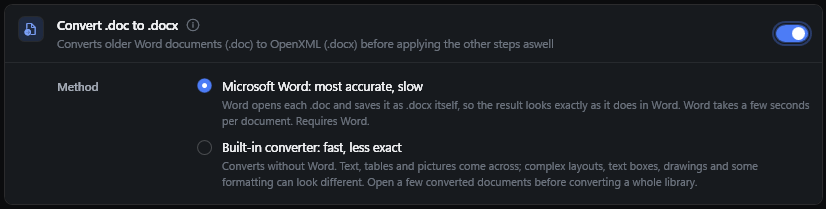
Turn on Convert .doc to .docx
Without it, .doc files are left out of the run. With it, each one becomes one more document in the job.
- 3
Pick a converter
Convert three or four typical files with the built-in converter and open them in Microsoft Word. If they look different from the originals, choose Microsoft Word instead.
- 4
Add the rest of the job
Conversion always runs first, so every other step works on the new .docx. Repoint links to an old server, replace a letterhead or clean up metadata in the same run.
- 5
Read the report
Filter by Warnings to find the files whose macros stayed behind in the .doc, and by Failed to find the ones that couldn't be converted.
Microsoft Word, or the built-in converter?
You choose per job. Both save the .docx under the .doc's name, in the same folder.
- Microsoft Word
- Opens each .doc in Microsoft Word and saves it as .docx. The result looks exactly as it does in Microsoft Word, but each document takes a few seconds. Needs the desktop version of Microsoft Word on the same PC.
- Built-in converter
- Doesn't need Microsoft Word and takes a fraction of a second per document. Text, tables, pictures, footnotes and comments come across. Complex layouts, text boxes, drawings and equations can look different.
- Macros
- A .docx can't hold macros, so the converted file is saved without them and the report gives a warning. The macros stay in the .doc and are not run. To keep them, open that .doc in Microsoft Word and save it as .docm.
- Not converted
- Files from Microsoft Word 95 or older, .rtf files renamed to .doc, damaged files, and files that need a password to open. A protected file is left unchanged. Your organization's File Block Settings in Microsoft Word can also block old formats.
Where the .docx goes
- Next to the .doc
- Without an output folder, the .docx is saved beside the .doc under the same name. The .doc is never changed or deleted.
- In the output folder
- With an output folder, only the .docx stays there, in the same subfolder structure.
- When a later step fails
- The new .docx is deleted again, and the .doc stays as it was. The report gives the reason.
- On a re-run
- A .doc with a .docx of the same name beside it isn't converted again. That .docx is edited instead, and the .doc is reported as Skipped. To convert it again, delete or rename the .docx.
Good to know
- Only files ending in .doc are converted. .rtf, .odt and PDF files aren't read at all.
- The Replace images picker reads .docx files only. To replace a logo in old files, convert them in one run and pick the images in the next.
- With "Check each document after editing" on, files from the built-in converter often get the warning that the saved document has formatting irregularities. Open a few to judge.
- During the free trial, each .doc counts as one document.
Questions about converting .doc files
How faithful is the .doc conversion?
Microsoft Word gives the most faithful result. The built-in converter is quicker and doesn't need Microsoft Word, but can differ on complex layouts. Macros are dropped, with a warning, and the .doc file itself is never changed.
The app finds no .docx files, but the folder has documents.
Usually one of three things:
- They are .doc files, and Convert .doc to .docx is off.
- They are in subfolders, and "Include subfolders" isn't selected.
- You don't have access to their folder. A subfolder that can't be read is skipped without a message.
Are my documents uploaded anywhere?
No. BatchDocProcessor processes documents locally. The app contacts our servers only to activate, renew or release a license, to count the free trial, and, if enabled, to check for updates. Run reports store no document content.
Privacy noticeWhat happens when a document fails?
It is restored to its original state and left where it is, and the run continues. The report gives the reason and a hint. Files open elsewhere, read-only or protected by a password are reported as failed.
Can I convert the files without changing anything else?
Yes. Turn on Convert .doc to .docx and no other step. Each .doc becomes a .docx, and the .doc files stay as they are.
Can I convert .doc files on a PC without Microsoft Word?
Yes, with the built-in converter. It's quicker than Microsoft Word, but complex layouts, text boxes, drawings and equations can come out differently. Check a few results first.
Other jobs for a whole folder
- Rebrand every document in one run
- Change the headers and footers in every document
- Find and replace text in every document
- Give each document its own values from a spreadsheet
- Update property fields without Microsoft Word
- Replace a logo in every document
- Remove metadata, comments and tracked changes
- Update links and paths after a server move
- All use cases
Convert ten of your oldest .doc files as a test.
Your originals stay unchanged by default, and the report shows what happened to each file.
- Every feature, for 7 days or 50 documents, whichever comes first.
- No license key, account or card needed. Needs an internet connection.
- When it ends, the editing steps lock. Nothing is charged or renewed.
- Processed on your PC. Your documents aren’t uploaded.